 NoHowTech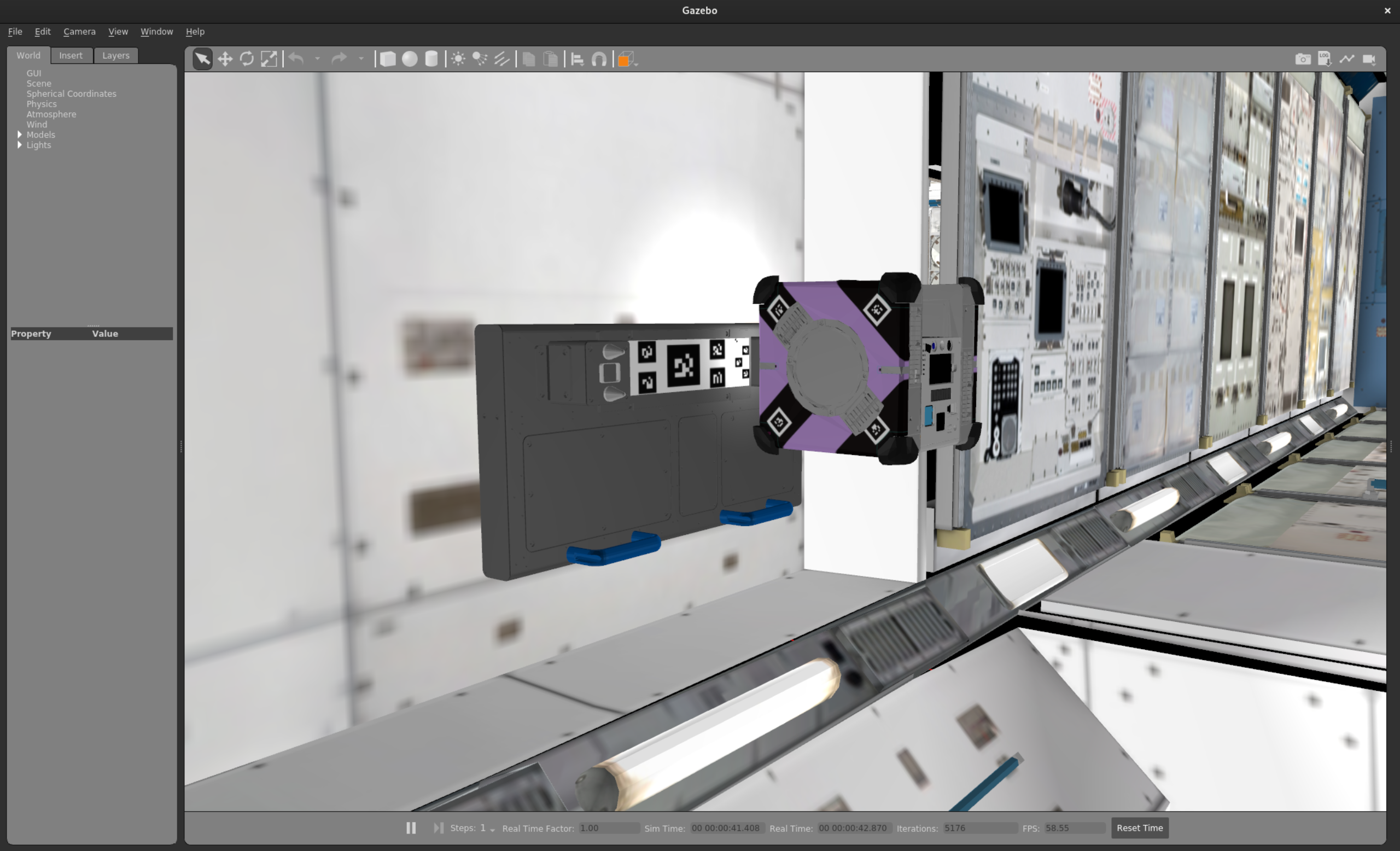
Contents
Astrobee Simulator: Getting Started
Introduction
From NASA’s website:
It turns out that astronauts could use some help with their chores, just like many of us on Earth. Juggling priorities and schedules plays a big part in an astronaut’s life aboard the International Space Station, and teams of flight controllers on the ground are constantly working to optimize the precious human work hours in space. Getting some assistance from robots that can take on some tasks will make work on the station more efficient. 1
And that’s most of what you need to know! The Astrobee is an assistant for astronauts in space. There are actually 3 bots deployed up there - Honey, Bumble, and Queen. These robots primarily operate independently and are able to assist astronauts with tasks such taking inventory, moving objects, and recording video of experiments. The Astrobee is a free-flying robot that can move around the International Space Station (ISS) using fans and propellers. It has a variety of sensors, including cameras, LIDAR, and IMUs, which allow it to navigate and interact with its environment.
Another huge benefit of the Astrobee is that it can be used to develop novel algorithms for autonomous navigation and manipulation in microgravity. This is a great opportunity for robotics researchers to test their algorithms in a unique environment that is difficult to replicate on Earth. It’s not just limited to NASA - the Astrobee is open-source and available for anyone to use, which means that researchers, hobbyists, and students can all get involved in developing new capabilities for the robot. Getting your code up to the ISS involves going through a rigorous process with Arkisys and NASA, but the benefits of being able to run your code on the Astrobee in space are huge.
Getting Started
To start you’ll need a computer running Linux or Windows with WSL2. The Astrobee simulator is built on top of ROS (Robot Operating System) and Gazebo, which are both open-source robotics frameworks. The easiest way to get started is to use Docker, which allows you to run the simulator in a containerized environment without having to worry about dependencies or installation issues. To install Docker, follow the instructions on the Docker website. Additionally, if you have an Nvidia GPU, you can install the Nvidia Container Toolkit to enable hardware acceleration for the simulator. This will allow you to run the simulator with better performance and visual quality.
Once docker is installed, you can run through the standard guide that NASA provides for cloning the repo and getting setup. Just to make it easy, the steps are as follows:
# Step 0: Install dependencies
sudo apt-get install build-essential git

# Step 1: Setup your Astrobee workspace
export ASTROBEE_WS=$HOME/astrobee

# Step 2: Clone the Astrobee repository
git clone https://github.com/nasa/astrobee.git $ASTROBEE_WS/src
cd $ASTROBEE_WS/src
git submodule update --init --depth 1 description/media

# (Optional) Step 3: If you're working with guest science code, pull the Android repo
git submodule update --init --depth 1 submodules/android
And that’s it! Astrobee is now on your computer and ready to run.
Running the Simulator
Now that you have the Astrobee simulator installed, you can run it using the following command. This will launch the simulator with RViz, SViz, and GDS enabled, which are all useful tools for visualizing and interacting with the robot in simulation.
./scripts/docker/run.sh --focal --remote roslaunch astrobee sim.launch rviz:=true sviz:=true gds:=true
If you have an Nvidia GPU, the above command will detect it and enable hardware acceleration automatically. If you don’t have an Nvidia GPU, the simulator will still run, but it may be slower and have lower visual quality.
Once the simulator is running, you can use the following command to undock the Astrobee from its docking station. This will allow it to move freely in the simulated environment.
docker exec -it astrobee /astrobee_init.sh rosrun dock dock_tool -undock
Conclusion
The Astrobee simulator is a powerful tool for robotics researchers and enthusiasts to develop and test algorithms for autonomous navigation and manipulation in microgravity. By following the steps outlined in this guide, you can get started with the simulator and begin exploring the capabilities of the Astrobee robot. Whether you’re a student, hobbyist, or professional researcher, the Astrobee simulator provides a unique opportunity to work with cutting-edge robotics technology in a space environment.
Stay tuned to see how you can use the Astrobee simulator to develop and test your own experiments, and to see how much it will cost to get your code up to the ISS!
References
S. Kanis, “What is Astrobee?,” Nov. 2016. Accessed: Aug. 06, 2026. [Online]. Available: https://www.nasa.gov/astrobee/ ↩︎